

How does the instant 3D printing quote work, and is the price final?
Updated
On this page
- The instant quote at a glance
- The price: a person checks every file after you pay
- Step 1: Upload a 3D file or a photo, or start with no file
- Step 2: Choose the method, material, colour and quantity
- Step 3: Advanced settings, only if you know what you want
- Step 4: Pick a speed, then collect it or have it delivered
- Step 5: Pay by card or PayNow, after one last check
- Step 6: Track your order through five stages and chat with our team
- When to ask us instead: jobs the instant quote can’t price
- Frequently asked
Our instant 3D printing quote prices a part in seconds: you upload a file, choose how it is made, pay and track it, all on one page with no email needed. Is the price final? You pay the price shown at checkout; then our team reviews every file, and if a part is not printable as uploaded or needs an adjustment, we contact you before printing.
The instant quote at a glance
| What you do | What you see |
|---|---|
| 1. Upload. Drop in a 3D file or a photo, or several at once | Your file in the quote, and a first price |
| 2. Choose the basics. Pick the print method, material, colour and quantity | A 3D preview with the part’s measurements, and the price changing as you choose |
| 3. Advanced settings (optional). Set layer height, infill, walls, extras and finishing | The added price of each extra beside it |
| 4. Speed and delivery. Save the quote, then pick how fast and how it reaches you | Checkout in four steps: Review, Speed, Delivery and Pay |
| 5. Pay. Pay by card or PayNow | A payment summary with GST, a quotation PDF and a review button |
| 6. Track. Open Track Your Order | Five stages from Order placed to Ready or shipped, and a chat with our team |
The price: a person checks every file after you pay
The price on screen comes from your file and your choices, and it is what you pay at checkout. After payment, our team reviews every file before it goes on a printer. If a part is not printable as uploaded, or needs an adjustment, we contact you before printing.
- Unsure about your choices? Press Request a review on the Pay step, before you pay, and we check the part first.
- Parts that fit together need the right gaps between them, and those are yours to set. Our guide to tolerances and clearances gives the numbers.
- What drives the price: size, material, finish and speed. What 3D printing costs in Singapore explains each one.
Step 1: Upload a 3D file or a photo, or start with no file
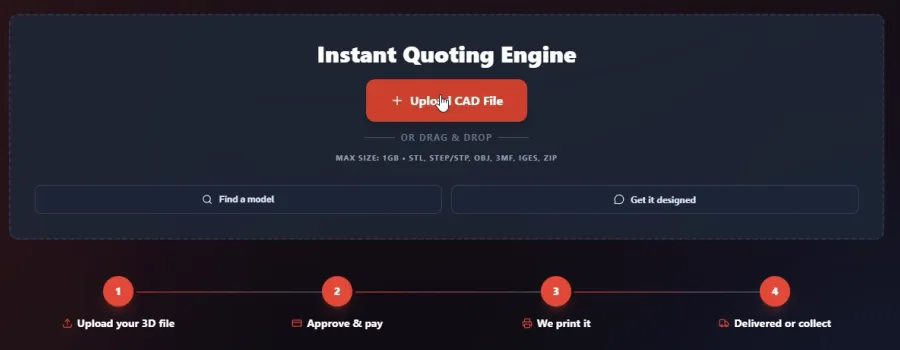
Press Upload CAD File or drag your files onto the page. It takes STL, STEP or STP, OBJ, 3MF, IGES and ZIP files, plus JPG or PNG photos, up to 1 GB each, and several at once. Not sure your file is ready? See how to export and send a 3D file.
No 3D file? Press Find a model to choose from free models (how to tell if a free file will print), or Get it designed to describe the part or drop in a photo, and our AI designs it.
Step 2: Choose the method, material, colour and quantity
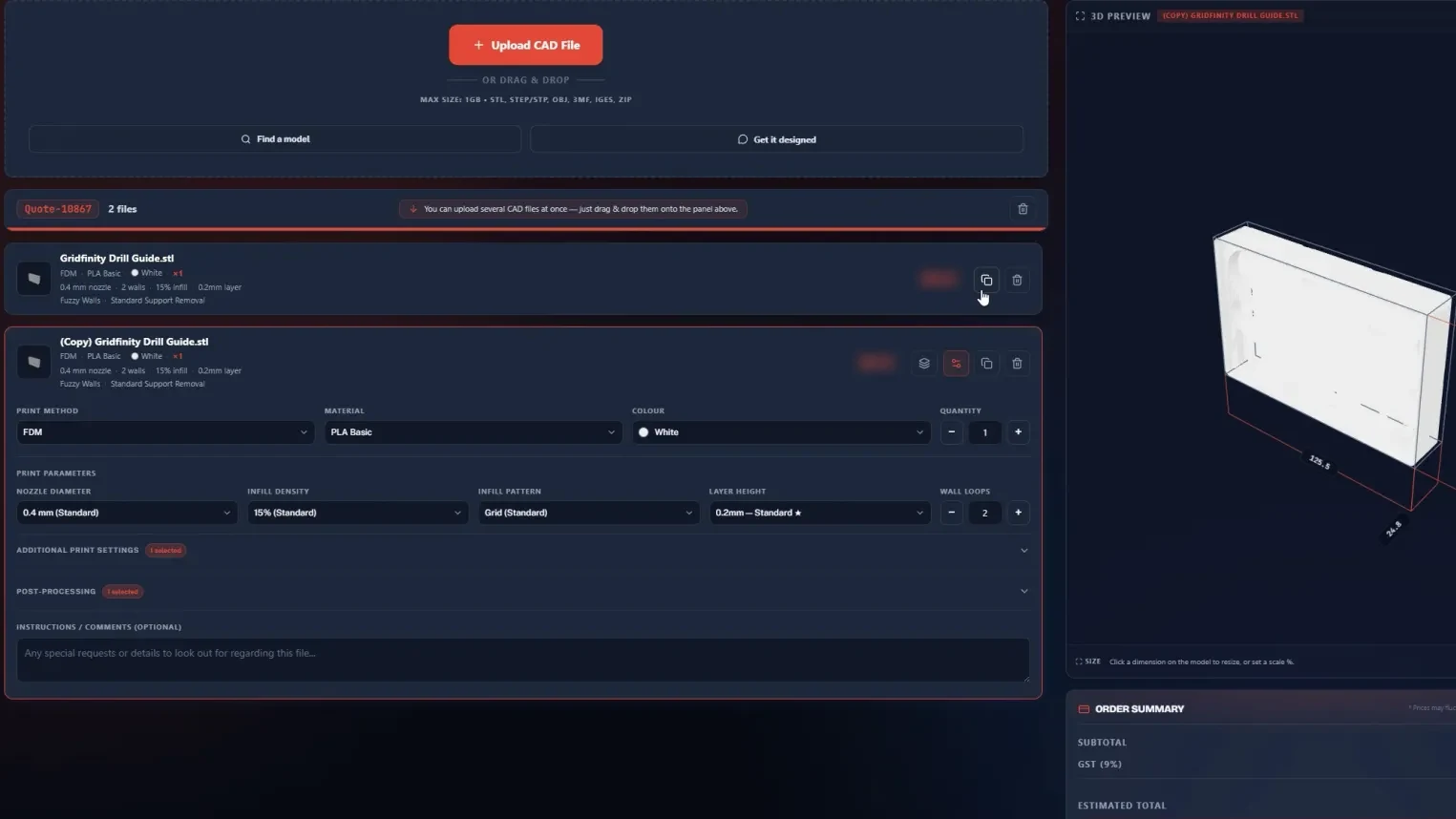
Each part gets four choices: the print method, the material, the colour and how many. The price beside the part changes as you choose. Not sure which to pick? Our materials guide matches materials to jobs, or ask our AI assistant or our team from the quote page.
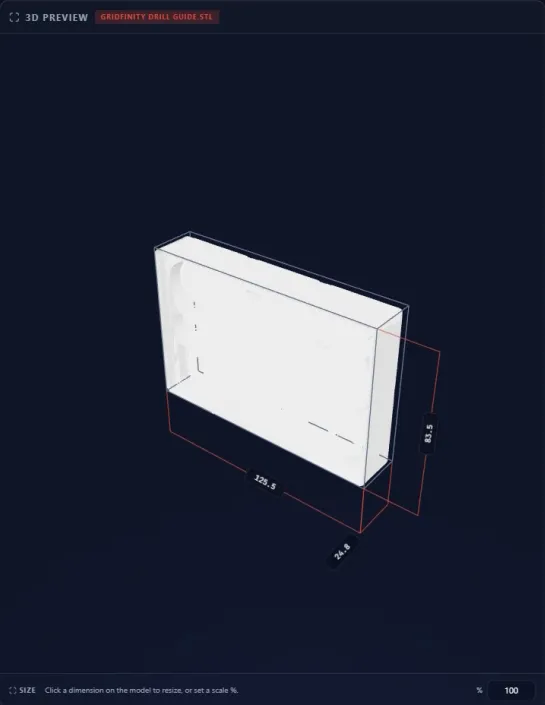
The 3D preview shows the part’s measurements in millimetres. If it came out the wrong size (a file drawn in inches is the usual cause), click a measurement to change it, or scale the whole part by a percentage.
Step 3: Advanced settings, only if you know what you want
The sliders icon on a part opens its advanced settings. Leave them alone and the part prints on our standard settings, which suit most jobs.
- Print settings: layer height (thinner layers look smoother but take longer), infill (how solid the inside is) and walls (how thick the outer skin is).
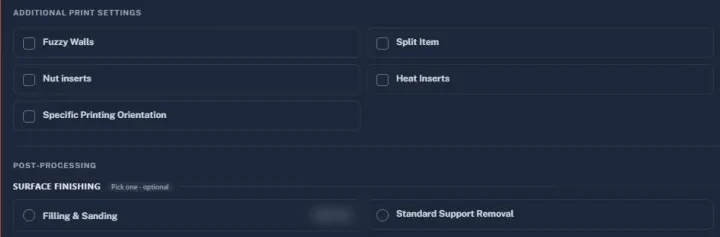
- Extras: heat-set inserts or nuts for screws, magnets, a part split into pieces, multicolour printing, or a set print direction.
- Post-processing: support removal, filling and sanding, and paint in a single colour or a clear coat, over a primer. See our finishing options before you pick one.
- Comments: a box for anything we should look out for.
Ordering several parts? The copy icon duplicates a part, and the layers icon copies one part’s settings to the others, so you set them only once.
Step 4: Pick a speed, then collect it or have it delivered
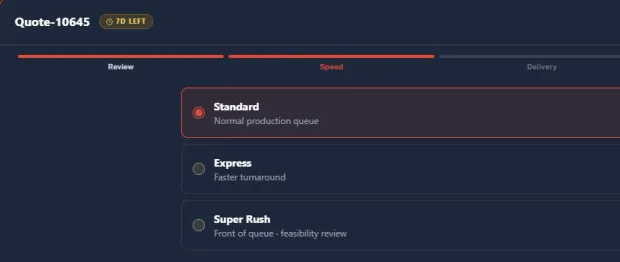
Press Save and Proceed to Checkout. Your quote is saved under Quotes for 7 days, with the days left shown beside it, and checkout runs in four steps: Review, Speed, Delivery and Pay.
Speed is your place in the print queue. For a filament part (fused deposition modeling, FDM) or a resin part (stereolithography, SLA) of normal size, about 10 to 15 cm across, with no post-processing:
- Standard: 4 to 7 working days.
- Express: 3 to 5 working days.
- Super Rush: 1 to 3 working days, at the front of the queue once we have checked it can be done.
These times are a rough gauge: the real date depends on our production queue, but they are what we usually meet.
Nylon powder parts, printed by selective laser sintering (SLS) or Multi Jet Fusion (MJF), and metal parts have Express and Super Rush too, but on their own times, so check with us. Painted or plated parts take 12 to 18 working days in all for 1 to 3 parts. A batch of 15 or more takes at least 15 working days painted or 18 plated, often longer, so ask us. Big parts take longer too. More in how long an order takes.
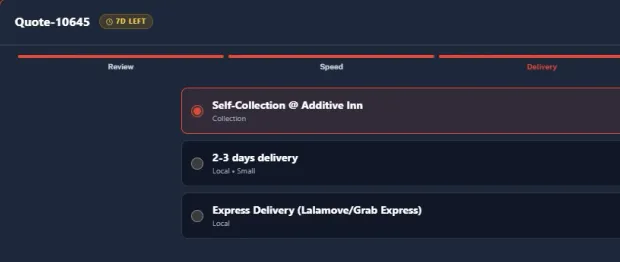
Delivery is self-collection at our studio in Bendemeer, delivery in 2 to 3 days, or an express courier. See how to self-collect.
Step 5: Pay by card or PayNow, after one last check
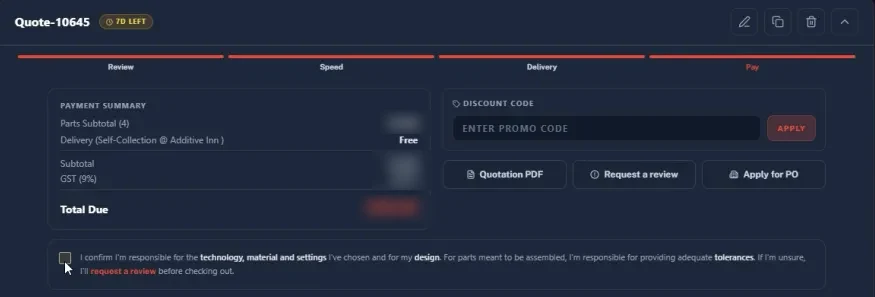
The Pay step shows the payment summary with GST, and a box for a discount code. Two buttons help before you pay:
- Quotation PDF: a formal quote for whoever approves the spend.
- Request a review: our team checks your part and settings before you pay.
Tick the box to confirm you are responsible for the method, material and settings you chose, and for your design, then pay by card or PayNow. The quote works for personal and business orders alike: a business account can also press Apply for PO to pay by purchase order. Copies of the same part get cheaper in bulk: see the volume discounts on our pricing page.
Step 6: Track your order through five stages and chat with our team
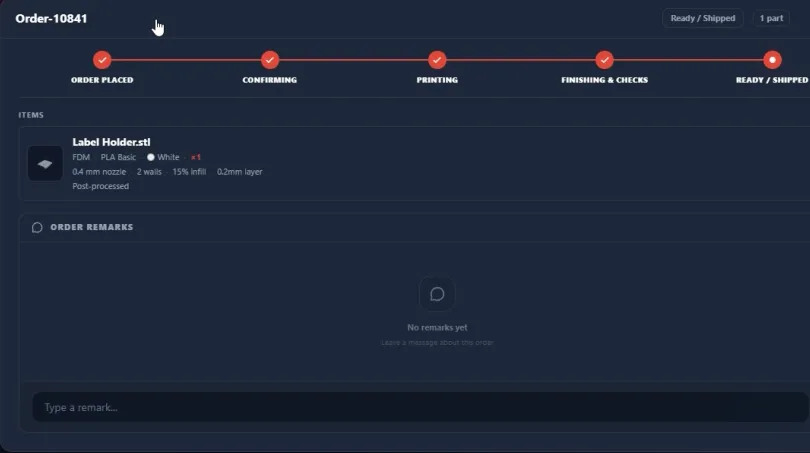
Track Your Order shows each order moving through five stages: Order placed, Confirming, Printing, Finishing and checks, then Ready or shipped. Every order has its own remarks chat, so a question about it stays with the order.
Order History keeps your past orders. The File Library keeps your past uploads for 7 days, so a part can be quoted again without finding the file.
When to ask us instead: jobs the instant quote can’t price
The instant quote prices most jobs for our 3D printing service, but some need a person to price them: very large parts, assemblies of many parts, or anything that is not a plain print, such as silicone moulding, injection moulding or crystal awards. Acrylic signs have their own instant price in our sign studio. For the rest, send us the details and a quote comes back within 24 hours, usually the same business day. Our studio is at 994 BENDEMEER ROAD, #07-06, B CENTRAL, SINGAPORE 339943, open Monday to Friday, 10:00 to 18:00.
Frequently asked
Is the instant quote price final?
You pay the price shown at checkout, and then our team reviews every file. If a part is not printable as uploaded, or needs an adjustment, we contact you before printing. Not sure about your settings? Press Request a review on the Pay step and we check the part before you pay.
What files does the instant quote accept?
STL, STEP or STP, OBJ, 3MF, IGES and ZIP files, plus JPG or PNG photos, up to 1 GB each. You can upload several at once. Files saved in a CAD program's own format, such as SolidWorks or Rhino, need exporting to one of these first; STEP is the best choice if we might need to adjust the design.
Can I get an instant quote without a 3D file?
Yes. Press Find a model to pick from free 3D models, or Get it designed to describe the part or drop in a photo, and our AI designs it for you. For a part that has to fit something exactly, a designer is the safer route, so talk to us about our design service.
How long does an instant quote order take?
A filament (FDM) or resin (SLA) part of normal size, about 10 to 15 cm across, takes 4 to 7 working days on Standard, 3 to 5 on Express and 1 to 3 on Super Rush, with no post-processing. Nylon powder (SLS and MJF) and metal parts run on their own times, so check with us. Painted or plated parts take 12 to 18 working days in all for 1 to 3 parts. A batch of 15 or more takes at least 15 working days painted or 18 plated, often longer, so ask us.
How do I pay for an instant quote order?
By card or PayNow, on the Pay step of checkout. Business accounts can also apply to pay by purchase order (PO). The same step has a discount code box and a Quotation PDF button, for when someone else has to approve the spend before you pay.
Do you give a discount for more copies of a part?
Yes. The volume discount is applied in the quote, and from 100 units we review the batch first. Our pricing guide lists the current discounts.
How long is a saved quote kept?
A saved quote, and every file in your File Library, is kept for 7 days, and each one shows how many days it has left. Check out before the count runs out, or upload the file again for a fresh quote.
Can I talk to someone about my order after paying?
Yes. Every order has a remarks chat under Track Your Order, and the team answers there. You can also message us on WhatsApp.
Related
-
 GuideHow much does 3D printing cost in Singapore?
 -
 GuideHow do I export and send a 3D file so it prints first time?
 -
 GuideHow long will my 3D printing order take?
 -
 ServiceIndustrial 3D Printing
 -
 ServiceSLA 3D Printing
 -
 ServiceConcept to Fabrication
 -
 ProjectWet lens adapter for an action camera dive housing
 -
 ProjectRaspberry Pi Zero enclosure for SMARTER AI
 -
 ProjectElectronic parts holding jig for Sanwa Intec