

Bambu Lab AMS
$235.00 – $490.00 SGD
excl. GST · 9% added at checkout
Made to order
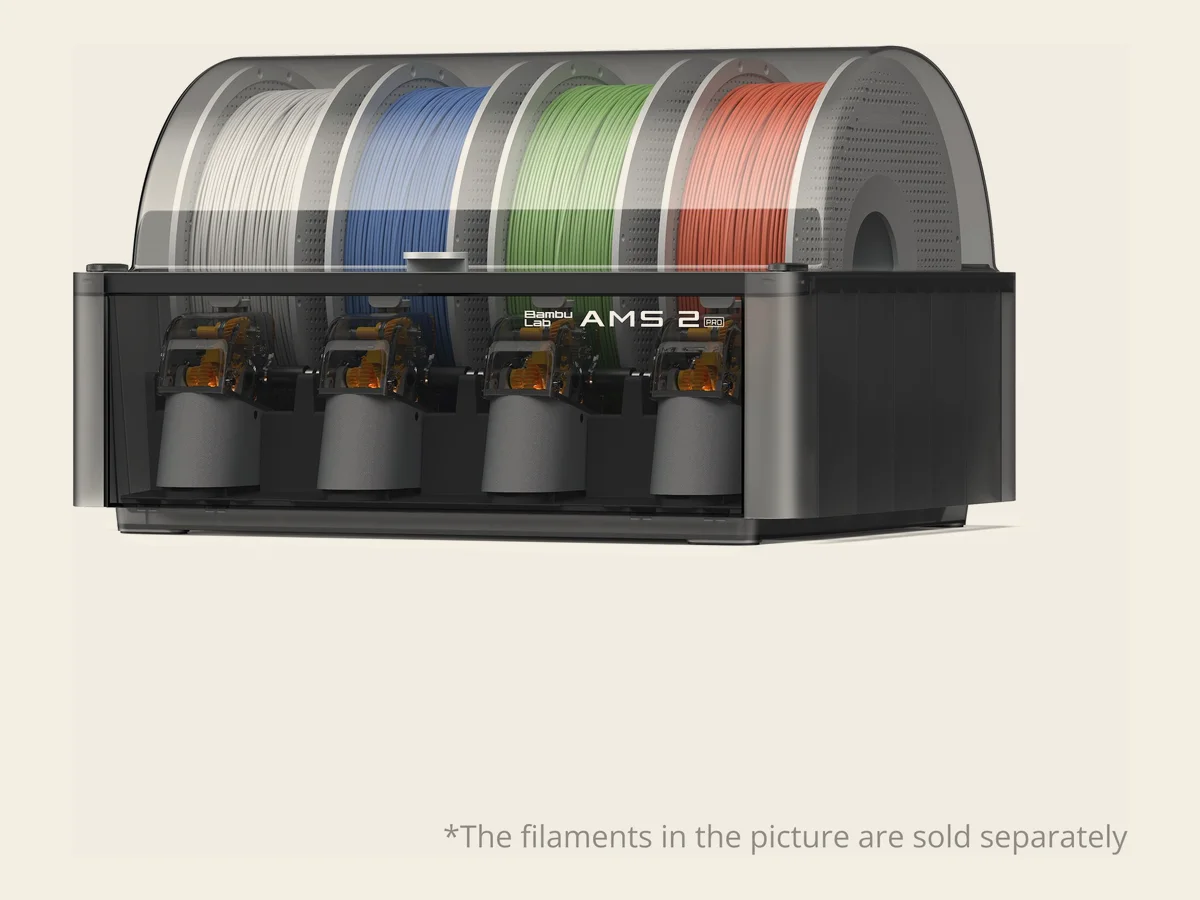
The one to buy for almost any machine. Four spools in a sealed box that actively dries them at up to 65°C, vents the moisture out, and turns the spools so they dry evenly. It fits every printer Bambu currently sells, and a brushless servo motor makes filament changes about 60% faster than the original AMS.
- Holds 4 spools; chain up to 4 units for 16 colours
- Active drying to 65°C with an electro-magnetic air vent
- Airtight storage with live temperature and humidity readout
- Brushless servo feeding motor, 60% faster changes
- RFID sync Bambu filament sets its own drying profile
- Ceramic filament inlets, 1200 Vickers, for wear resistance
- 372 × 280 × 226 mm, 2.5 kg, ABS and PC housing
Works with the A1 series, X1, P1, P2S, X2D and the whole H2 series, though some combinations need an extra hub, buffer or adapter. Tell us your printer model and we'll confirm which parts you need.
- Holds 1 spool; chain up to 8 on the H2 series
- Drying to 85°C, for engineering filament
- Bypass outlet for soft, brittle or abrasive filament
- Screen showing live temperature, humidity and time left
- RFID sync and filament odometry
- UL 94 V-0 flame-retardant PC and PA housing
- 114 × 280 × 245 mm, 1.21 kg
The AMS HT runs from its own power cable; the printer can't power its heater. Pair it with an AMS 2 Pro when you print both everyday and engineering materials.
- Holds 4 spools on rotary holders
- For the A1 and A1 mini only
- RFID sync with genuine Bambu filament
- Automatic backup switches spools when one runs out
- Includes the desk stand and PTFE tubes
- 397 × 208 × 342 mm, 1.6 kg
The AMS lite can't be combined with other AMS units, and it has no drying or sealed storage. If you need either, put an AMS 2 Pro on your A1 series printer instead, using the A1 series AMS Hub.
Four spools, sealed, with 65°C active drying. Fits every current Bambu printer.
Made to order, ships in about 7 days.
SKU · BL-AMS2-PRO
Bambu Lab
Bambu Lab AMS
Four spools instead of one, so a print can change colour or material on its own. Which one you want comes down to your printer, and whether you need drying.
Which one fits your printer
The printer you own narrows it to one or two; drying decides the rest.
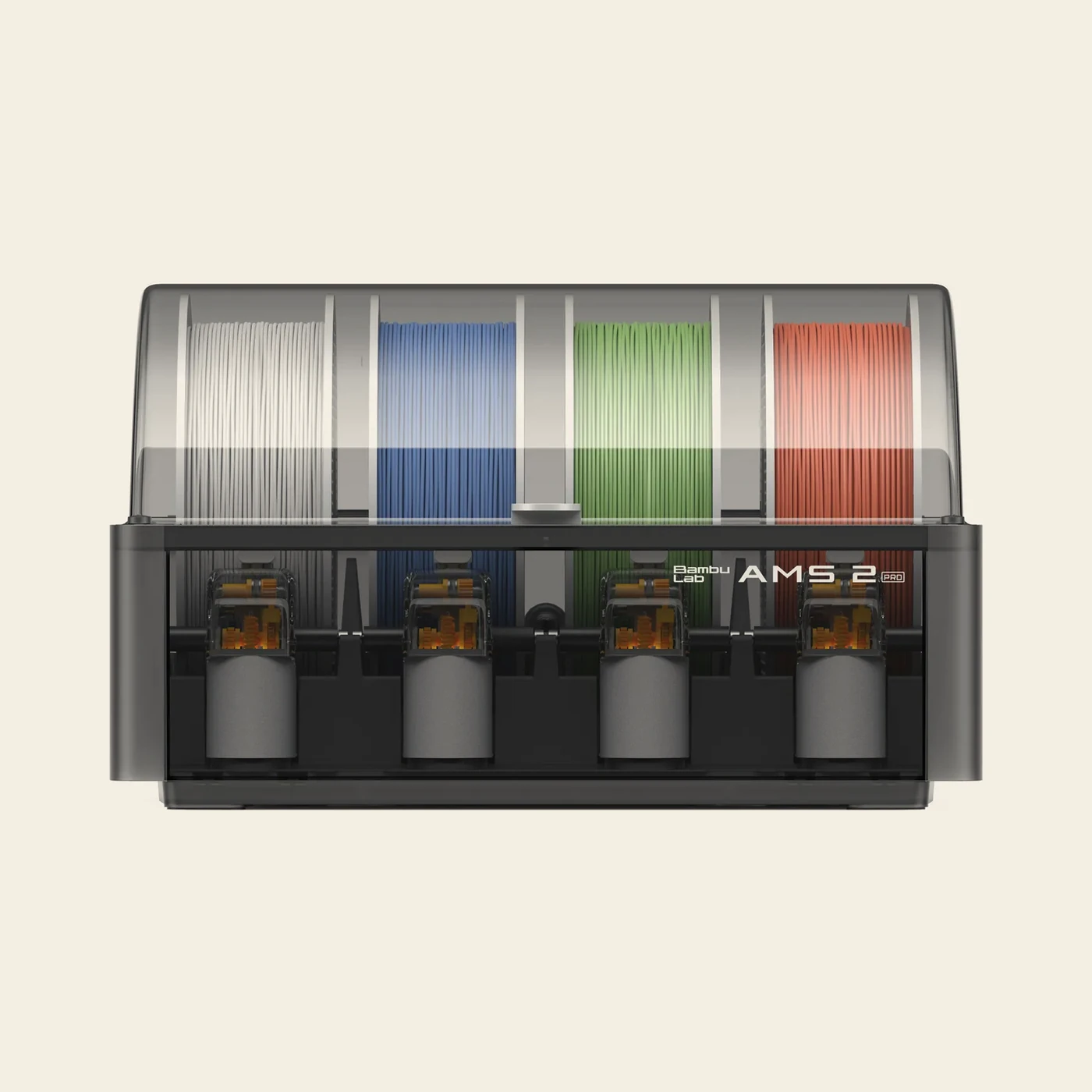
AMS 2 ProAlmost everyone
Four spools, sealed, dries to 65°C. Works with every current Bambu printer including the A1 series. The default choice unless you own an A1 and want the cheapest route to four colours.
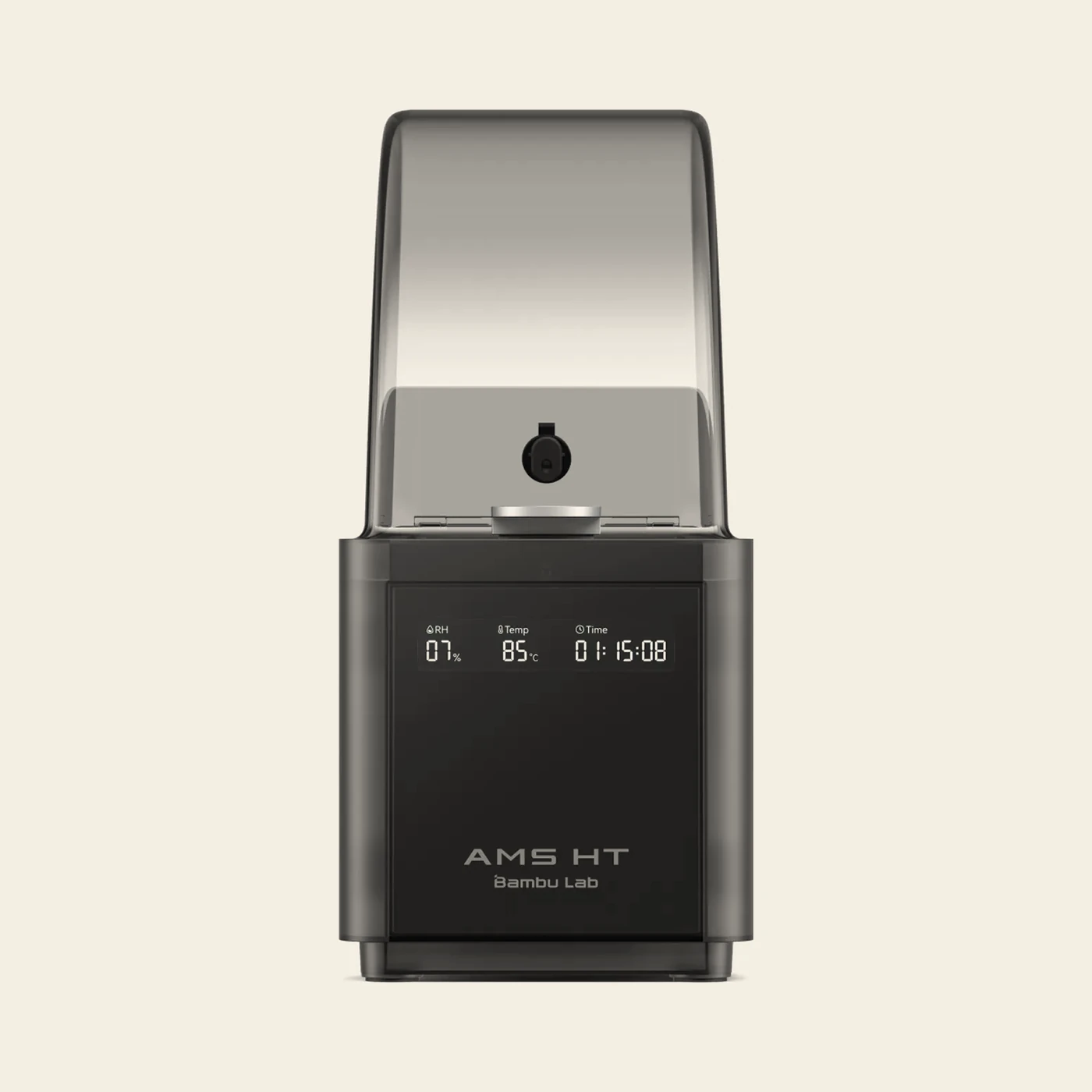
AMS HTEngineering filament
One spool, dries to 85°C. Buy it alongside an AMS 2 Pro when you print nylon, PC, PVA or fibre blends, or when you need the bypass outlet for filament no AMS will feed.
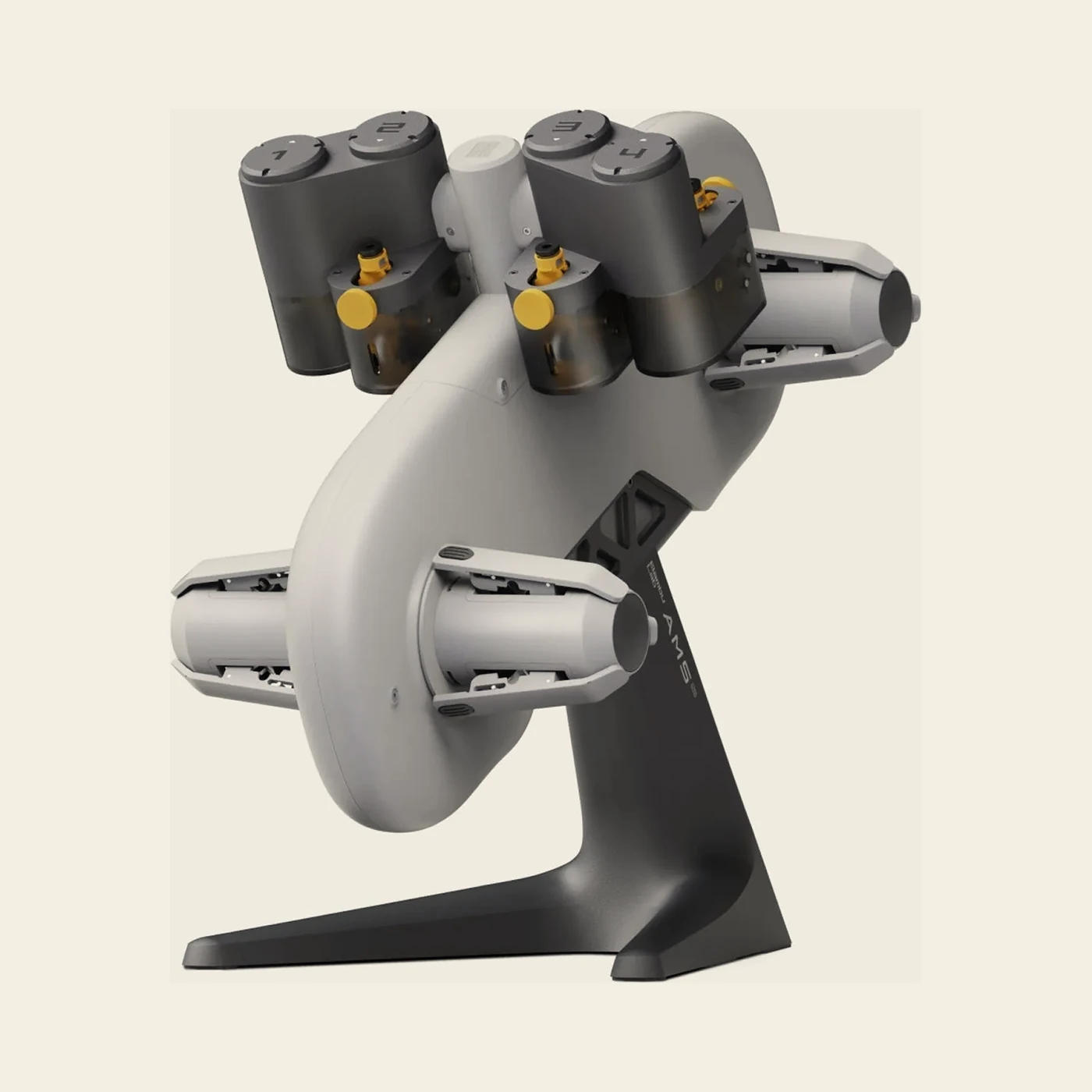
AMS liteA1 and A1 mini
Four spools on an open stand, no drying, no sealed storage. Only for the A1 series, and it can't be combined with other AMS units. The cheapest way to get four colours on an A1.
Drying is the real reason to buy one
In this climate it's the drying, not the colour count, that changes what comes off the bed.
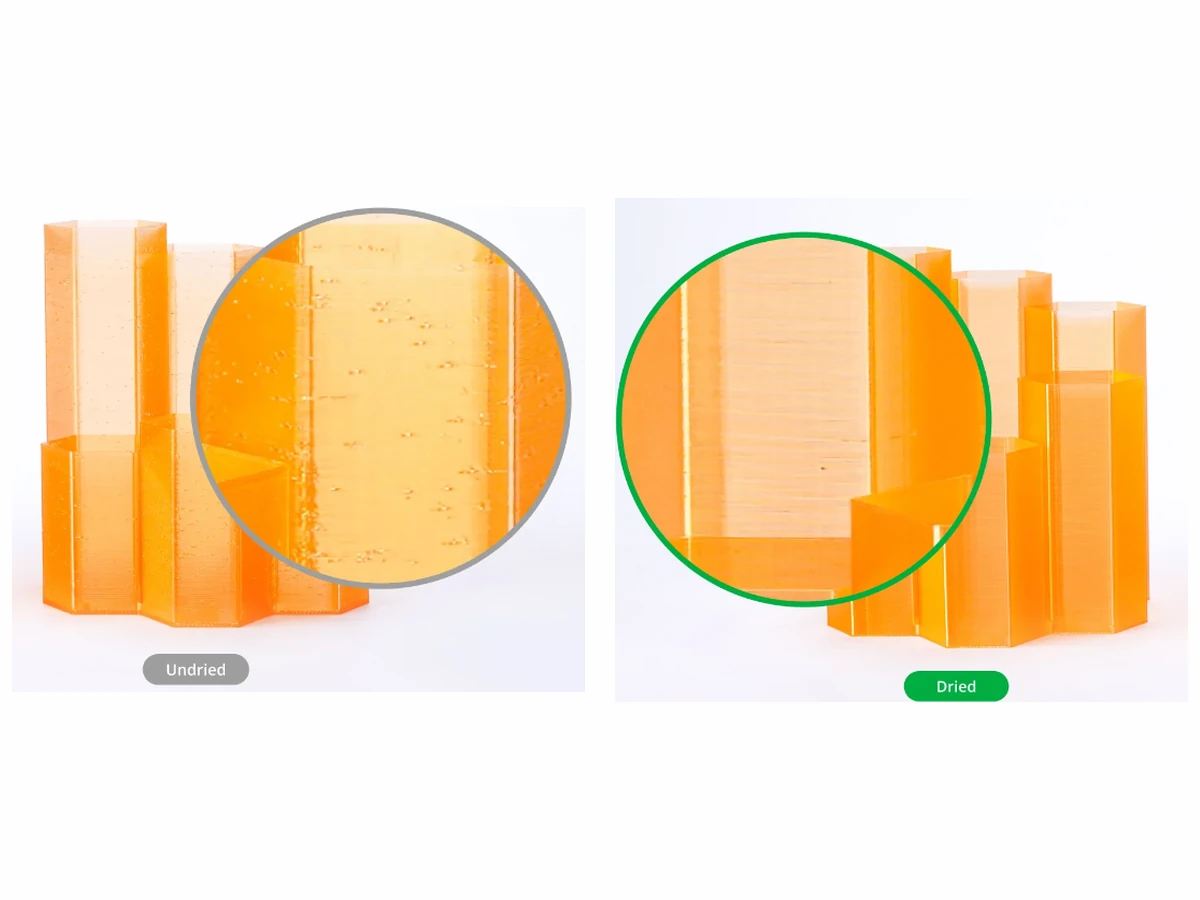
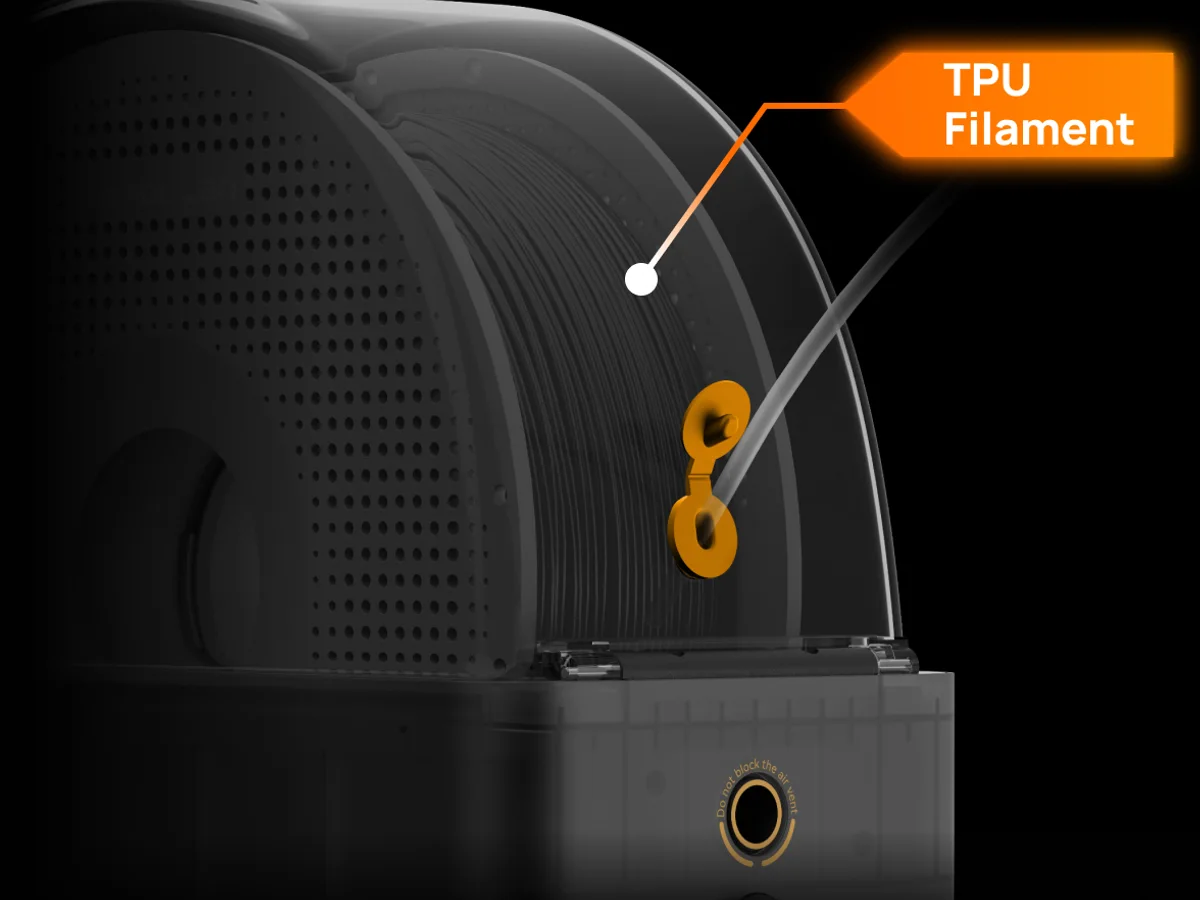
Multi-colour printing is what the AMS is sold on, but in Singapore's humidity it's the drying and the airtight storage that change your print quality week to week. Filament that's sat open on a shelf strings, pits and snaps well below its rated strength, exactly as in the picture.
The AMS 2 Pro heats to 65°C and vents the moisture out instead of recirculating it. The spools turn slowly, so they dry evenly. That covers PLA, PETG and TPU for AMS comfortably.
It's not enough for ABS, ASA, PC, nylon, PVA or the fibre blends, which need 80 to 85°C. That's the gap the AMS HT fills, at 85°C, with a screen showing live temperature and humidity. Full drying figures by material are on the filament page.
The wet air leaves the box
A sealed box that only heats is a box full of damp warm air.
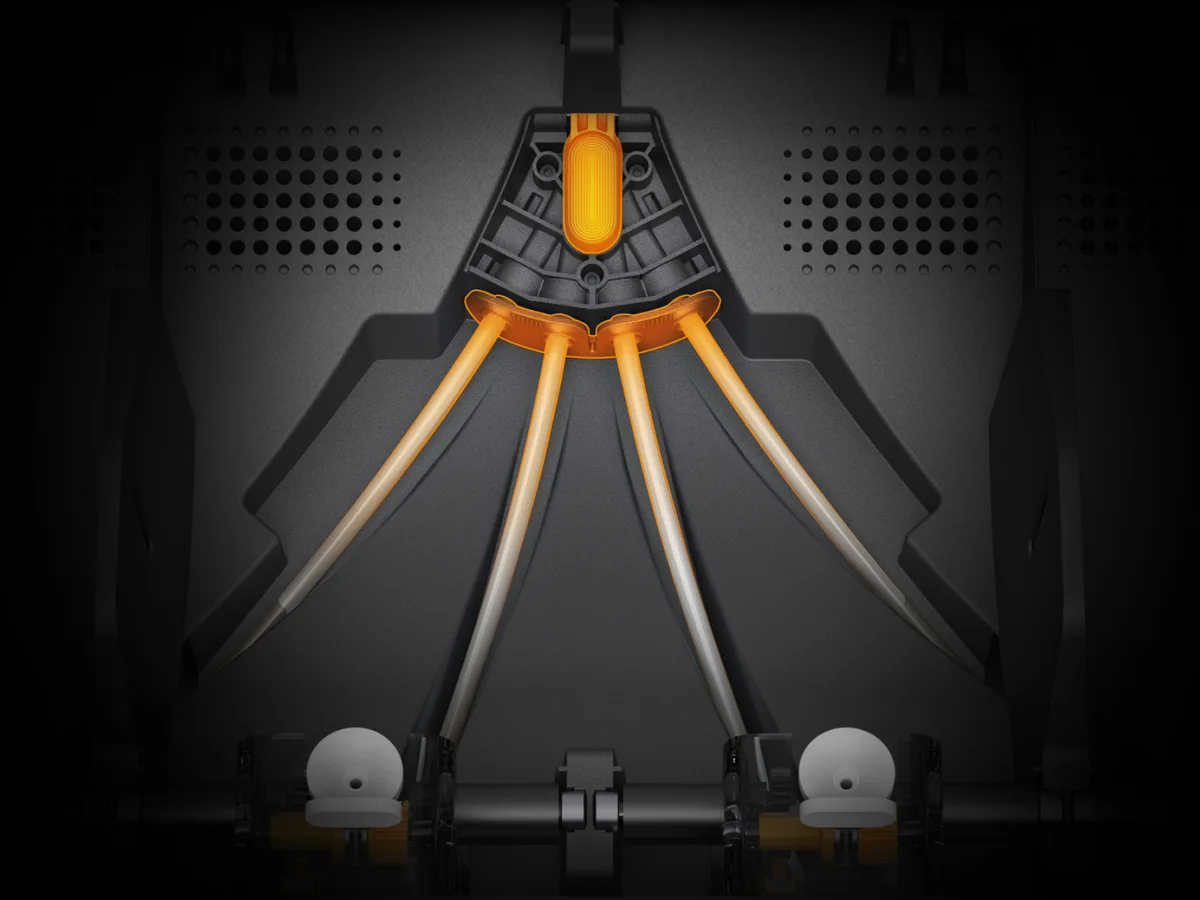
The AMS 2 Pro pushes heated air along its four spools and lets the moisture out through an electro-magnetic vent instead of sending it round again. That's the difference between drying a spool and warming it.
The spools turn slowly while it runs, so the heat reaches the whole coil and not just the outside of it. The unit reports temperature and humidity back to the printer while it works.
Ceramic filament inlets, rated 1200 Vickers, take the wear where the filament goes in. The rest of the path is the same PTFE you get across the range.
Eighty-five degrees, on a screen
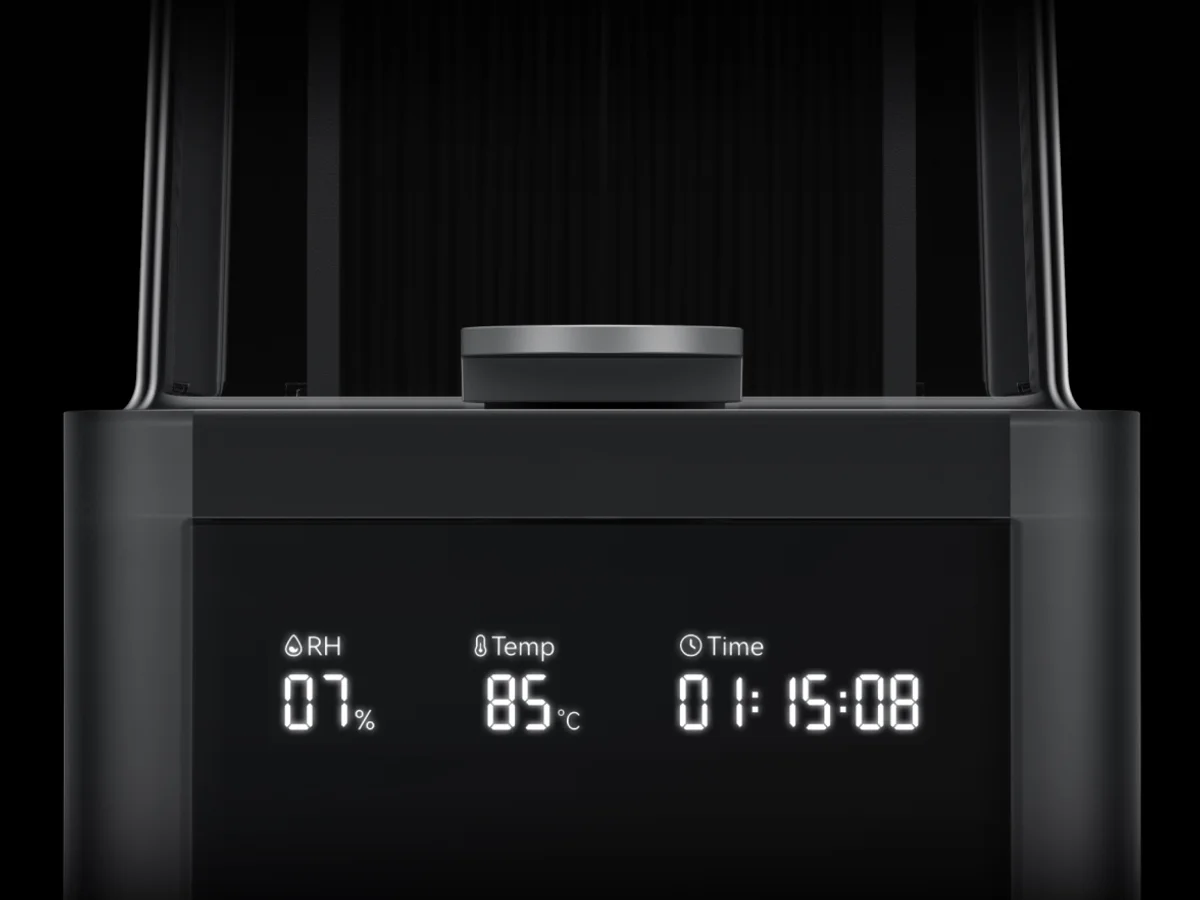
Engineering filament needs 80 to 85°C. That's above anything an AMS 2 Pro will reach.
ABS, ASA, PC, nylon, PVA and the fibre blends don't dry properly at 65°C. The AMS HT is the single-spool unit that goes to 85°C. The screen on the front shows live humidity, temperature and time left, so you can check a dry cycle instead of assuming it.
It runs from its own power cable, because the printer can't supply its heater. You can chain up to eight onto an H2 series machine alongside the AMS 2 Pro units.
The housing is UL 94 V-0 flame-retardant PC and PA. That's the part of the spec sheet that matters when a box is held at 85°C for hours at a stretch.
The lite is a different thing
Open frame, no seal, no heat. That's the trade you're making.
It isn't a smaller AMS 2 Pro. There's no sealed box and no drying. Four spools sit out in the open on a stand beside the printer, so the humidity of the room is the humidity of your filament.
What it does do is four colours on an A1 or A1 mini for the least money of anything here, and it's the only unit those machines take. If multi-colour is why you're on this page and your printer is an A series, this is the answer.
If drying is the reason instead, the lite won't give it to you. An AMS 2 Pro will work on an A1 through the A1 series AMS Hub. That's the route to take when the filament matters more than the colour count.
Four colours, one part
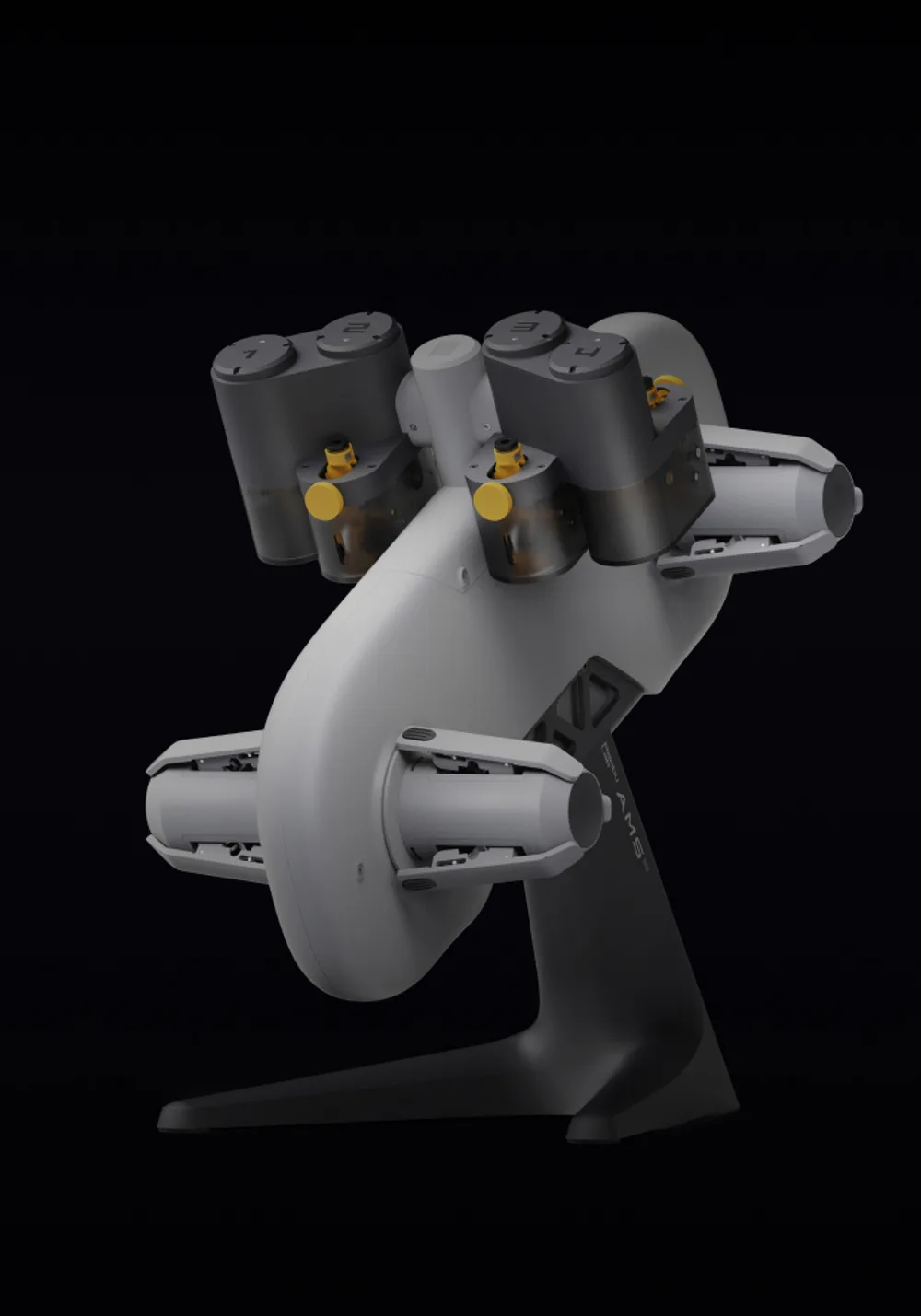
The cheapest route to four colours on an A1, and the only one those machines take.
The AMS lite parks four spools on rotary holders and swaps between them mid-print, so an A1 or A1 mini becomes a four-colour machine. It also switches to a backup spool automatically when one runs out, which is what saves an overnight job.
It's open-frame: no sealed storage and no drying. In this climate that means keeping the spools in a box with desiccant between prints, and drying anything moisture-sensitive on the printer bed before it goes on.
It can't be combined with other AMS units, and it won't feed PLA Glow, PETG-CF or PLA Wood reliably: it lacks the extra feed gear the full AMS has. If you need any of that on an A1, fit an AMS 2 Pro with the A1 series AMS Hub instead.
The filaments no AMS will feed
A straight path out of a dry box, with no feed channel to survive.
Every AMS has a curved feed path, and some filament simply won't survive it. Generic TPU and TPE are too soft and buckle. PET-CF, PPA-CF and PPS-CF are too brittle and snap, or too abrasive and grind the PTFE tubes out.
The AMS HT's bypass outlet is the answer: an independent, straight path from a dried, sealed box into the printer. The filament gets the drying and the airtight storage without going anywhere near a feed channel.
That, plus 85°C drying, is why an AMS HT is the unit to add when your work moves past PLA and PETG. It holds one spool at a time, and that spool can be the one nothing else will take.
From the spool to the nozzle
Every unit here except the lite feeds in two stages, and that single fact is why the shopping list has a buffer on it.
A feeder in every slot
Each slot has its own motor, its own gears and its own filament detection sensor. Push filament in and the feeder pulls it the rest of the way; unload it and the drive shaft turns the spool to wind it back on. The inlet is a ceramic-reinforced anti-wear bushing rated 1200 Vickers, so years of filament dragging over the same spot don't cut a groove in it.
The hub that merges them
The AMS 2 Pro's internal hub carries four Hall sensors, a magnetic rotary encoder and a brushless motor. It joins the four paths into one and supplies the second-stage push. Bambu rates that servo at about 60% faster feeding than the original AMS, roughly 10 minutes saved per 100 filament changes. The AMS HT has one path, so its hub is a feeder, an assist motor and a retraction assembly that winds filament back onto the spool.
Two stages, so a buffer is compulsory
The feeder pushes into an assist motor, and the assist motor pushes into the toolhead. Those two are never perfectly speed-matched, so a filament buffer has to sit between any AMS, AMS 2 Pro or AMS HT and the printer. Inside it: a slider, a spring and a Hall sensor. Filament pressure moves the slider, the sensor reports where it sits, and the AMS trims its feed speed to keep tension in band.
The hub, once you own two
On an X1 or P1 series machine, two or more units replace the buffer with an AMS Hub: four inlets, each with its own Hall sensor, and a buffer module built into the same shell. Four units, 16 spools. The A1 series takes a different hub of its own, and Bambu voids the part's warranty if you fit the X1 or P1 one instead.
What each sensor is watching
The funnel sensor answers whether filament arrived at all, which is how an empty slot and a snapped end look different to the printer. The buffer's Hall sensor watches tension. On the AMS HT an odometer wheel counts the length fed and a Hall sensor at the outlet confirms the filament actually left, which is how a break gets located instead of guessed at. A magnet in the HT's lid handle tells the printer you opened it mid-cycle.
The tube between everything
PTFE, 4 mm on the outside, 2 to 2.5 mm on the inside depending on which run it is, so buy the part for the run you're replacing. It's a consumable: the printer prompts a check every 2 months, and abrasive filament halves that to monthly. In a multi-unit chain keep the longest tube under about 3.5 m, or feed resistance starts costing you load time. All of it is on the filament path parts page.
Inside the AMS lite
Different mechanism, not a cheaper version of the same one. It's the single-stage design that decides what the lite can and can't do.
A feeder in every slot
Each of the four slots has a filament detection sensor, an odometer with a passive wheel that only turns when filament is genuinely moving, and a speed sensor at the base of its DC motor. Comparing what the motor is doing against what the odometer sees is how the lite catches slipping before a print starves.
Rotary holders, not a rim
The four spring-loaded holders grip the spool's centre hole rather than its edges, which is why the accepted size is quoted as a 53 to 58 mm hole and a 40 to 68 mm width. On unload the holder rotates to take up slack, up to 150°, so it can pull in a little and no more.
Single stage, so no buffer
The lite's feeder pushes straight into the toolhead instead of into an assist motor. That's the whole reason it needs no filament buffer, and also why it can't share a printer with an AMS, AMS 2 Pro or AMS HT.
Tangle detection on the toolhead
The four PTFE tubes land in a small filament hub clipped to the top of the extruder. Under the hub sits a magnet, and the bracket holding it is spring-loaded. Feed resistance pushes the hub down, the magnet moves towards a Hall sensor, and the tangle alarm fires before the print is ruined.
Pre-load and backup
Insert filament while the printer is idle and the feeder pushes about 40 cm into the tube on its own. Turn on AMS filament backup in the settings and the lite switches to another spool of identical brand, type, colour and nozzle temperature when one runs out. Bambu for Bambu, third-party for third-party.
No drying, and no sensor to tell you
There's no heater, no seal and no humidity sensor, so the room's humidity is your filament's humidity. Between prints the spools go back in a sealed box with fresh desiccant. Bambu suggests a 4 litre box with a thermo-hygrometer in it, aiming under 20% RH.
Before you order
Tell us the printer and we'll confirm the parts before you pay for the wrong ones.
An AMS 2 Pro connects straight to an H2 series, X2D or P2S printer. On the A1, X1 and P1 series it needs an extra hub, buffer or cable. Chaining more than two units needs a 4-in-1 PTFE adapter. Tell us your printer model and how many units you want. We'll confirm exactly which parts the setup takes and quote them with the unit.
On some machines, drying draws more power than the printer can give it. The H2 series, P2S and X2D will power one AMS 2 Pro for drying. Every other combination, and every extra unit, needs the 24V 4A switching adapter. The AMS HT always runs from its own cable.
If you're buying the AMS with the printer, the Combo configurations on the printer page bundle both for less than buying them separately.
Prices exclude GST. We add 9% at checkout. PayNow is free; paying by card adds a flat 4% processing fee. Self-collect free at Bendemeer, or islandwide courier at $15 flat, free once the order passes $250 before GST.
Inside the drying box
A heater, a fan, a closed loop over the spools, and two vents that push the water out of the building rather than round the box again.
Heater, fan, sensor
The AMS 2 Pro carries two drying modules under the main frame, each one a heater, a fan and a temperature sensor, and it tops out at 65°C. The AMS HT carries one, with an NTC sensor, and reaches 85°C. That single number is the whole difference between drying PLA and PETG, and drying nylon, PC and PVA.
The loop inside the box
Heated air leaves the outlets near the hub, runs along the spools, and gets drawn back through the front inlets to be reheated. The spools turn slowly while it runs, so the heat reaches the inside of the coil and not just the outside of it.
Where the wet air goes
Two actively controlled vents do the part that matters: the bottom one is the intake, the rear one is the exhaust. Moisture leaves the box through that external circulation instead of being warmed and sent round again. Box the unit in tight against a wall and you've blocked the exhaust, and it will dry badly.
The seal and the desiccant
A rubber ring between the lid and the shell keeps the box airtight. Inside is colour-changing silica gel: on the AMS 2 Pro the yellow beads turn purple when they're spent, on the AMS HT they turn dark green, and the HT takes two packs under its rear shaft. Take the pack out of the sealed outer bag before it goes in and leave the breathable inner bag on. Bambu has dropped calcium chloride desiccant across the range, because saturated it can dissolve and leak into the circuits.
Why the humidity number climbs after a dry cycle
Both units report relative humidity as a percentage, on the printer screen, in Bambu Studio and in Handy. Expect the reading to climb straight after a dry cycle. That's the box cooling: colder air holds less vapour, so the percentage rises even though no water came back in. Judge by filament type and by the colour of the desiccant, not by watching the number.
Neither one dries on its own
There's no standalone dryer mode on either unit. Drying needs the 6-pin bus cable running to a printer that's switched on, so a cycle is something you start from the printer screen and not from the box itself.
How hot, and for how long
Bambu's own drying table, cut down to the two units on this page and the printer bed you'd otherwise be using. The hours are theirs, not ours.
| Filament | AMS 2 Pro | AMS HT | Printer bed |
|---|---|---|---|
| PLA Basic, Matte, Silk, Galaxy, Aero | 45°C, 12 h | 45°C, 12 h | 60–75°C, 12 h |
| PLA-CF, PLA Wood | 45°C, 12 h | 45°C, 12 h | 65–75°C, 12 h |
| Support for PLA, Support for PLA/PETG | 60°C, 12 h | 60°C, 12 h | 65–75°C, 12 h |
| PETG, PETG-CF | 65°C, 12 h | 65°C, 12 h | 75–85°C, 12 h |
| TPU 85A, 90A, 95A HF, TPU for AMS | 65°C, 12 h, and Bambu says it may not fully dry | 75°C, 18 h | 80–90°C, 12–16 h |
| ABS, ASA, ASA-CF, ABS-GF, ASA Aero | Not compatible | 80°C, 8 h | 90–100°C, 12 h |
| PC | Not compatible | 80°C, 8 h | 90–100°C, 12 h |
| PVA | Not compatible | 85°C, 18 h | 90–100°C, 12 h |
| PA6-CF, PAHT-CF | Not compatible | 85°C, 12 h | 90–100°C, 12 h |
| PET-CF | Not compatible | 80°C, 12 h | 90–100°C, 12 h |
| Support for PA/PET | Not compatible | 80°C, 12 h | 90–100°C, 12 h |
| Support for ABS | Not compatible | 80°C, 4 h | 85–95°C, 6 h |
| PPA-CF, PPS-CF | Not compatible | Not compatible | 110–120°C, 10–12 h, and still worse than an oven |
Swipe the table sideways for every column
Bed drying needs an enclosed machine: H series, X series, X2D, P2S, or a P1S done by hand. The open-frame A1, A1 mini, A2L and P1P can't do it at all. PPA-CF and PPS-CF beat every unit on this page and want a 100 to 140°C forced-air convection oven. Never a microwave, and never a kitchen oven: both heat unevenly enough to deform the spool. Per-material detail is on the filament page.
Side by side
| AMS 2 Pro | AMS HT | AMS lite | |
|---|---|---|---|
| Spools | 4 | 1 | 4 |
| Drying | 65°C, active | 85°C, active | None |
| Sealed storage | Yes | Yes | No |
| Humidity readout | Yes | Yes, on-unit screen | No |
| Printers | All current models | All current models | A1 and A1 mini only |
| Chain up to | 4 units, 16 colours | 8 units on H2 series | 1 unit only |
| Bypass outlet | No | Yes | No |
| Size (mm) | 372 × 280 × 226 | 114 × 280 × 245 | 397 × 208 × 342 |
| Weight | 2.5 kg | 1.21 kg | 1.6 kg |
Swipe the table sideways for every column
An AMS 2 Pro and up to eight AMS HT units chain on an H2 series printer for 24 filaments in one print. The AMS lite is the exception: one unit, on its own, on an A1.
AMS 2 Pro, in full
| Spool capacity | 4 |
|---|---|
| Spool it accepts | 50 to 68 mm wide, 197 to 202 mm across, holding 1.75 mm filament |
| Dimensions | 372 × 280 × 226 mm |
| Net weight | 2.5 kg |
| Housing | ABS and PC |
| Drying, maximum | 65°C. Bambu's footnote: it only reaches 65°C when the room is above 25°C, which in Singapore it always is. |
| How it dries | Two drying modules under the main frame, each a heater, a fan and a temperature sensor. Heated air runs a closed loop over the four spools; the bottom vent draws room air in and the rear vent pushes the moisture out. |
| Sealed storage | Yes, with a rubber sealing ring between the top cover and the outer shell. |
| Desiccant | Colour-changing silica gel. Yellow beads turn purple when it's spent. Out of the sealed outer bag before it goes in, breathable inner bag left on. |
| Humidity and temperature | Its own sensor at the front of the cabin, reported as a percentage on the printer screen, in Bambu Studio and in Bambu Handy. |
| RFID | Two coils. Genuine Bambu filament brings its own print and drying profile across. |
| Filament inlets | Ceramic-reinforced anti-wear bushings, 1200 Vickers. The tubes are reachable from the top with no tools, so clearing a snapped end doesn't mean unloading every spool. |
| Power input | 24 V, 4 A |
| Printers | H2D, H2C, H2S, X2D, P2S, X1 series, P1 series, A1, A1 mini and A2L. Several of those need a hub, a buffer or an adapter; the parts table below says which. |
| Most you can chain | H2 series and X2D: 4 units, alongside up to 8 AMS HT, for 24 filaments in one print. P2S: 4. X1 and P1 series: 4 units in total, 16 colours. A1 series: 4. |
| In the box | AMS 2 Pro, desiccant, PTFE tube (2 × 185 mm, 2 × 225 mm, 1 × 900 mm) and a 6-pin Bambu bus cable. No switching adapter, no buffer, no hub. |
Use the 6-pin cable that came with the unit. The first-generation AMS cable has a different step height, 1.1 mm against 2.5 mm, and causes unstable communication. An old AMS runs fine on the new cable; a new unit does not run reliably on the old one.
AMS HT, in full
| Spool capacity | 1 |
|---|---|
| Spool it accepts | 50 to 68 mm wide, 197 to 202 mm across |
| Dimensions | 114 × 280 × 245 mm |
| Net weight | 1.21 kg |
| Housing | PC and PA, rated UL 94 V-0 flame retardant |
| Drying, maximum | 85°C, with a rotating drying mode |
| How it dries | One drying module below the frame: a heater, a fan and an NTC temperature sensor. Heated air leaves the outlet, warms the spool and is drawn back through the inlet. The bottom vent takes air in, the rear vent pushes the moisture out. |
| Sealed storage | Yes, with a rubber gasket between the lid and the housing. |
| Desiccant | Colour-changing silica gel, two packs under the rear driven shaft. Yellow turns dark green when it's spent. Out of the sealed outer bag, breathable inner bag left on. |
| Screen | On the unit: live temperature, live humidity and the time left on the dry cycle. |
| Sensors | Humidity sensor inside the drying module, filament detection and an odometer wheel in the feeder, a Hall sensor at the outlet to confirm filament actually left, and a magnet-and-Hall lid-open detector. |
| RFID | Supported, with filament odometry, so the printer knows how much of the spool you've used. |
| Filament inlet | Ceramic-reinforced anti-wear sleeve, 1200 Vickers, with a release button behind it that drops the gear pressure so you can pull filament out by hand. |
| Bypass outlet | A second outlet at the back of the lid, for filament the gears can't handle. Straight path, fed through by hand. On the bypass it can't auto-load or auto-unload, and it can't dry while it's feeding a print through it. |
| Power | DC 24 V from an AC 100 to 240 V, 50/60 Hz supply. 150 W average. The cord is in the box, and the HT always runs from it: no printer powers its heater, on any model. |
| Over-temperature protection | An accurate temperature sensor plus a physical failsafe behind it. |
| Most you can chain | 8 on an H2 series or X2D machine, alongside up to 4 AMS 2 Pro, for 24 filaments. P2S: 4. X1 and P1 series: 4 units in total. A1 series: 4. |
| In the box | AMS HT, desiccant, PTFE tube (2 × 263 mm, 1 × 900 mm), a 6-pin Bambu bus cable and the power cord. |
The short version of the shopping list: on an X1 or P1 an AMS HT needs a PTFE tube coupler, a 4-pin cable and a filament buffer, and no power adapter at all. The AMS 2 Pro on the same machine needs the adapter as well.
AMS lite, in full
| Spool capacity | 4, on spring-loaded rotary holders |
|---|---|
| Spool it accepts | 40 to 68 mm wide, with a centre hole 53 to 58 mm across. It grips the hole, not the rim. 1.75 mm filament. |
| Dimensions | 397 × 208 × 342 mm, boxed at 470 × 290 × 340 mm |
| Weight | 1.6 kg, 3.7 kg boxed |
| Housing | ABS, PC and POM |
| Drying | None. No heater, no sealed box, no humidity sensor. |
| Feed | Single stage. Each slot's feeder pushes straight into the toolhead, which is exactly why it needs no filament buffer. |
| Sensors per slot | Filament detection, an odometer with a passive wheel that only turns when filament is genuinely moving, and a speed sensor at the base of the DC motor. The gap between the two speeds is how it catches slipping. |
| Tangle detection | On the toolhead: a magnet under the filament hub and a spring-loaded bracket. Feed resistance pushes the hub down, the magnet nears a Hall sensor, the alarm fires. |
| RFID | One coil per slot. Reading is on by default and can't be turned off. |
| Power | Over the printer's 4-pin bus cable. There's no separate power supply and nothing to plug into the wall. |
| Ambient | 10 to 30°C, humidity below 85%. |
| Printers | A1, A1 mini and A2L. One per printer, and it can't be combined with any other AMS unit. It isn't compatible with the X1 or P1 series at all. |
| Placement | About 50 mm from the printer, on its own stand. Not wall-mountable. Heavy spools go in slots 2 and 3 to keep the centre of gravity low. The feeder's maximum feeding distance is 1.2 m. |
| PTFE tube lengths | A1 mini: 580 mm for slots 1 and 2, 700 mm for slots 3 and 4. A1: 730 mm and 830 mm. |
| In the box | AMS lite, the desk stand and its 5 screws, 4 rotary spool holders, PTFE tubes, an H2 Allen key and a 4-pin Bambu bus cable. |
On an A2L the lite can run alongside up to 4 AMS units for 19 colours in total. On an A1 or A1 mini it's one AMS lite on its own, or up to 4 AMS units on the A1 series AMS Hub, never both.
What each unit will feed
This is about whether the filament survives the feed path, not whether your printer can melt it. Too soft, too brittle or too abrasive and it jams, snaps, or grinds out the PTFE tubes.
| Filament | AMS 2 Pro | AMS HT | AMS lite |
|---|---|---|---|
| PLA, PETG, ABS, ASA, PC, PA, PP, POM, HIPS | Yes | Yes | Most, but not ABS |
| PVA and BVOH, dried | Yes | Yes | Yes |
| PVA and BVOH, damp | No | No | No |
| Bambu PLA-CF, PETG-CF, PAHT-CF | Yes | Yes | Not recommended |
| PLA Glow, PLA Wood | Yes | Yes | Not recommended |
| TPU for AMS | Yes | Yes | No |
| TPU 95A, 85A, generic TPU, TPE | No | Bypass outlet only | No |
| PET-CF, PPA-CF, PPS-CF, other fibre blends | No | Bypass outlet only | No |
Swipe the table sideways for every column
What it won't feed, and why
The table above says yes or no. This one says what actually goes wrong, because the fix depends on the reason.
| Filament | What goes wrong | What to do instead |
|---|---|---|
| Generic TPU and TPE, TPU 95A, 90A, 85A | Too soft. It buckles inside the curved feed channel rather than pushing through, and the load fails or jams. | Run it out of an AMS HT's bypass outlet, or feed it by hand from a sealed box with the spool sitting higher than the toolhead inlet so it isn't fighting gravity. |
| TPU for AMS | Nothing. It's the one flexible stiff enough to survive the channel. | Loads normally in an AMS or AMS 2 Pro. The AMS lite still won't take it. |
| PET-CF, PA6-CF, PPA-CF, PPS-CF and other brands' fibre blends | Too brittle and too abrasive at once. It snaps inside the channel, and what doesn't snap grinds the PTFE tubes out from the inside. | AMS HT bypass outlet. Bambu's own PLA-CF, PETG-CF and PAHT-CF are the exceptions, tuned to be AMS-safe, and they load like any other spool. |
| Damp PVA and BVOH | Soft and swollen. The extruder gears flatten it and it clogs. | Dry it first: 85°C for 18 hours in an AMS HT, or 90 to 100°C on an enclosed printer's bed. Dry PVA and BVOH feed perfectly well. |
| ABS, ABS-GF, PLA Glow, PETG-CF and PLA Wood in an AMS lite | The lite is single-stage and has less feeding force than a full AMS, so brittle and abrasive filament gives loading errors and wears the parts faster. | All of it runs in an AMS or AMS 2 Pro. On an A1 that means an AMS 2 Pro fitted through the A1 series AMS Hub. |
| A refill with no spool | Nothing for the holders to hold. An AMS 2 Pro or AMS HT takes a spool 50 to 68 mm wide and 197 to 202 mm across, and a bare coil is neither. | Wind it onto a reusable spool first. The AMS lite grips a centre hole 53 to 58 mm across instead, and takes a 40 to 68 mm width. |
| A third-party spool in a dry cycle | Some aren't heat resistant enough and deform at drying temperature, which is a jam waiting to happen even if the filament is fine. | Check what the spool is rated for, or move the filament onto a reusable spool before you dry it. TPU spools grow a few millimetres wider while drying, which is normal. |
Swipe the table sideways for every column
Even where a filament loads cleanly, an abrasive one slowly wears the internal PTFE feed tubes. They're consumables and they're cheap, but if carbon-fibre work is your daily job, put it through the AMS HT bypass outlet and leave the feed channel out of it.
The parts your printer needs
An AMS unit on its own is rarely the whole order. What else you need depends entirely on the printer it's going onto, and on whether you want the drying.
| Printer | What it takes to connect | Drying power | Most you can chain |
|---|---|---|---|
| H2D and H2C | One or two units go straight into the built-in buffer. Three or more, or two plus an external spool, need a 4-in-1 PTFE adapter. The H2C wants the H2 series version of it, which has a filament cleaning pad the standard one lacks; without it debris reaches the hotends. | The printer powers one unit's drying. Every extra unit drying at the same time needs its own 24V 4A switching adapter. | 4 AMS 2 Pro and 8 AMS HT, for 24 filaments, or 25 with an external spool on a dual-nozzle machine. |
| H2S | The buffer is built in. Two or more units need a 4-in-1 PTFE adapter. | One unit free, its own adapter for every one after that. | 4 AMS 2 Pro and 8 AMS HT, 24 filaments. |
| X2D | One or two units connect with nothing extra, buffer included. Three or more, or two plus an external spool, need the standard 4-in-1 PTFE adapter. | One unit free, its own adapter for every one after that. | 4 AMS 2 Pro and 8 AMS HT, 24 filaments. |
| P2S | A standalone P2S plus a standalone AMS needs a P2S filament buffer; the Combo already has one. Three or more units also need a 4-in-1 PTFE adapter. | One unit free, but without an adapter the printer's power is diverted to the AMS and it can't heat or move while drying. With one, it prints and dries at the same time. | 4 AMS 2 Pro and 4 AMS HT, 20 slots. |
| X1 and P1 series | One unit: a filament buffer, a PTFE tube coupler and a 4-pin cable. Two or more: an AMS Hub in place of the buffer, plus the coupler and cable. Keep the AMS to the left of the hub and route the tube under the spool holder, not over it. Mind the 4-pin cable's direction: Bambu warns that inserting it backwards can burn out the printer and AMS mainboards. | Every AMS 2 Pro needs its own switching adapter. These printers never supply drying power at all. | 4 units in total, 16 colours. |
| A1 and A1 mini | The A1 series AMS Hub, and only that one. Fitting the X1 or P1 buffer or hub instead voids that part's warranty. Firmware 01.07.00.00 or later. | Every unit needs its own switching adapter. | 4 units, any mix. Or one AMS lite, which can't be combined with anything else. |
| A2L | One unit needs nothing extra, because the PTFE tube coupler is already in the tool kit. Two or more need a 4-in-1 PTFE adapter. | Every unit needs its own switching adapter. | 4 units plus one AMS lite, 19 colours. |
Swipe the table sideways for every column
Two exceptions run through the whole table. The AMS HT always runs from its own power cord, on every printer, and the cord is in the box, so only the AMS 2 Pro ever draws drying power from a machine. And if you never use drying, you never need an adapter at all. The AMS lite is outside the table entirely: it plugs into an A series printer's 4-pin bus, needs no buffer, no hub and no adapter, and one printer takes exactly one. Buffers, hubs, adapters, couplers and PTFE tube are all on the filament path parts page. Tell us the printer and we'll put the list together before you pay for it.
Drying a spool, start to finish
Six things decide whether a dry cycle works. Three of them are about what else is in the box.
Take the cool filament out
Drying a high-temperature material means the low-temperature spools have to come out first. Running an ABS cycle at 80°C with PLA sitting in the next slot softens the PLA. Bambu says it plainly: when you dry ABS, PLA cannot be in the AMS.
Leave it plugged into the printer
Neither unit dries offline. The 6-pin bus cable has to run to a printer that's switched on, and there's no standalone dryer mode to fall back on. An AMS 2 Pro drying on an X1, P1, A1 or A2L needs its own 24V 4A switching adapter as well; an AMS HT always runs off its own cord.
Pick the filament, not a temperature
Load the spool, choose the filament type on the printer screen and start. The unit sets the temperature and the duration from Bambu's own table. With genuine Bambu filament the RFID tag fills that in for you, which is most of the value of the tag.
Rotation, not static, for the soft ones
Static drying isn't suitable for PLA, PVA, Support for PLA/PETG or TPU: they soften enough at drying temperature to stick to themselves or deform. Switching to rotation means pulling the filament back out of the inlet by hand and laying the end against the side of the spool first.
Keep the back and the underside clear
The bottom vent draws room air in and the rear vent pushes the wet air out. Pressed against a wall or shelved in tight, the box can't get rid of the moisture and the cycle just warms the spool. Give it room behind.
It'll keep drying while you print, cooler
Once a print starts the unit drops the drying temperature below the filament's softening point so it can't clog the feed path: PLA falls to 45°C, PETG to 55°C. On H series machines, a printer that's busy also cuts drying power to prioritise the print. Check the desiccant every two weeks while you're at it; silica gel regenerates at 80 to 90°C, never above 100°C, and is good for five to fifteen cycles.
Setting up an AMS lite
It sits on a desk beside the printer rather than on top of it, and where you put it decides how well it feeds.
Give it 50 mm, no more
Bambu's figure is about 50 mm from the printer. Further away and the PTFE tube bends harder, feed resistance climbs and loads start failing. The feeder's maximum feeding distance is 1.2 m, so there's no version of this where the lite lives across the room.
Heavy spools low
Put the heaviest spools in slots 2 and 3 to keep the centre of gravity down. The lite ships with its own stand and five screws, and it can't be wall-mounted, so a stable footing is the whole plan.
Right tube in the right port
Tube lengths differ per slot and per printer, and they aren't interchangeable. A1 mini: 580 mm for slots 1 and 2, 700 mm for slots 3 and 4. A1: 730 mm and 830 mm. The four tubes land in the filament hub clipped to the top of the extruder.
Load and let it pull
Insert filament while the printer is idle and the feeder pushes about 40 cm into the tube by itself. The odometer wheel only turns when filament is genuinely moving, so if the indicator doesn't respond, it's the funnel that needs cleaning and not the setting.
Turn on filament backup
In AMS settings. It switches to another spool of identical brand, type, colour and nozzle temperature when one runs out, which is the feature that saves an overnight job. Bambu matches Bambu and third-party matches third-party.
Box the spools between prints
No heater, no seal, no humidity sensor: whatever the room is doing, the filament is doing. Sealed box, fresh desiccant, and anything moisture-sensitive dried on a printer bed before it goes on. Freshly dried filament left in 55% air is measurably worse within 2 to 12 hours, and Singapore's air is rarely that kind.